How to Read 13F Filings Without Falling Asleep
A plain-language guide to understanding 13F filings, what they reveal about institutional investors, and how to use Alphactor's 13F explorer to spot…
 Marcus Chen4 min read
What Is a 13F and Why Should You Care
Every institutional investment manager with over $100 million in qualifying assets must file a 13F with the SEC each quarter. This filing lists every US equity position they hold, including the number of shares and market value. Hedge funds, mutual funds, pension funds, endowments -- they all file.
This matters because these filings give you a look at what professional managers with significant capital and research teams are actually buying and selling. Not what they say on TV. What they put money behind.
The catch: 13F filings are dense, delayed by up to 45 days, and reported in a format designed for regulators, not individual investors. The 13F explorer parses and presents this data so you can extract the useful parts without wading through SEC markup.
Step 1: Open the 13F Explorer
Open the 13F explorer from the sidebar. You will see two primary views: By Fund and By Stock.

Start with whichever matches your question.
If you want to know what a specific manager is holding, use By Fund. If you want to know which institutions hold a stock you are researching, use By Stock.
Step 2: Look at Changes, Not Holdings
The most common mistake when reading 13Fs is focusing on what a fund holds right now. Static holdings tell you very little because you do not know when they bought or at what price. The actionable information is in the changes -- what they added, reduced, or exited since last quarter.
In the 13F explorer, each filing shows:
- New positions: stocks that appeared for the first time this quarter
- Increased positions: existing holdings where share count went up
- Decreased positions: existing holdings where share count went down
- Closed positions: stocks that disappeared entirely
New positions and closed positions are the most informative. A new position means the fund did fresh research and committed capital. A closed position means they decided to move on entirely, which is a stronger signal than a partial trim.
Step 3: Filter by Fund Type and Size
Not all 13F filers are equally useful to track. A passive index fund's 13F tells you nothing about stock-picking conviction. Use the filters to narrow your view:
- Filter by fund type: hedge fund, mutual fund, or pension fund
- Filter by AUM range to focus on managers whose positions are large enough to reflect genuine conviction
- Sort by position change percentage to see who made the biggest relative moves
A $500 million hedge fund adding a $20 million position in a mid-cap stock is a stronger signal than a $200 billion index fund making the same purchase as part of rebalancing.
Step 4: Cross-Reference with Your Own Research
The 13F explorer becomes powerful when you combine it with your existing analysis. Here is how:
- Run your usual screener to generate a shortlist
- For each stock on your shortlist, open the By Stock view in the 13F explorer
- Check whether institutional ownership is increasing or decreasing
- Look at which specific funds are buying -- are they known stock-pickers with strong track records, or are they index-huggers?
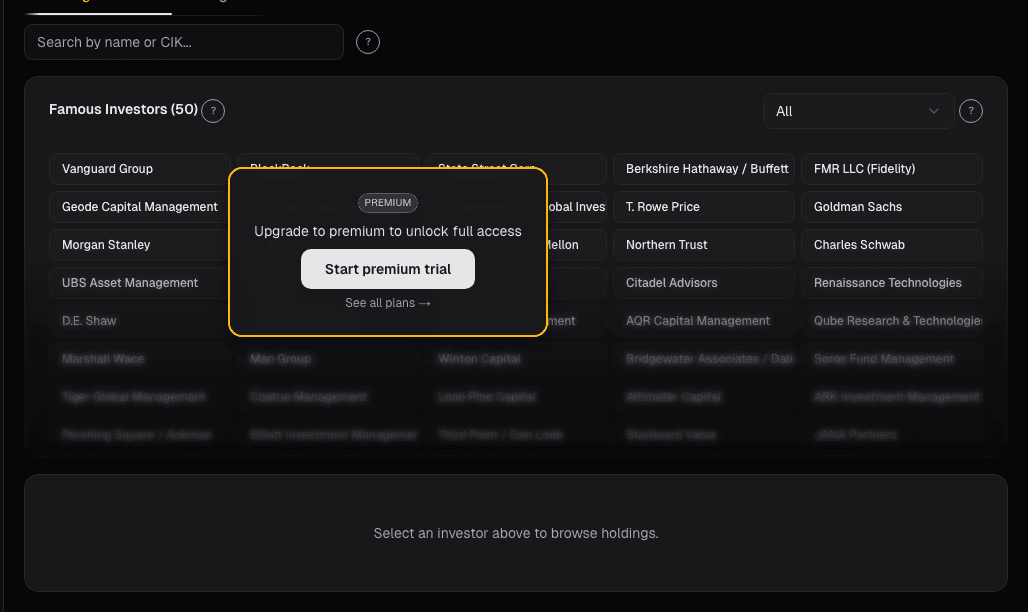
If a stock passes your quantitative screen and two well-regarded funds initiated new positions last quarter, that is not a buy signal, but it is confirming evidence worth noting.
Step 5: Understand the Limitations
13F filings have real limitations you should factor in:
The 45-day delay. Filings are due 45 days after quarter-end. By the time you read a March 31 filing, it is mid-May and the fund may have already changed the position. Treat 13Fs as directional evidence of conviction, not real-time positioning.
No short positions. 13Fs only disclose long equity holdings. If a fund is short a stock, it will not appear. Options positions are reported, but the data is harder to interpret.
No cost basis. You can see that a fund holds 500,000 shares, but you do not know what they paid. A position that looks large might be underwater.
No rationale. The filing does not explain why the fund bought or sold. You are inferring intent from actions, which is useful but not definitive.
Step 6: Set Up 13F Alerts
For the funds you follow most closely, set up alerts so you are notified when new filings drop. In the 13F explorer:
- Click the Follow button on a fund's profile
- Configure alert delivery in your alert settings
- When a new quarterly filing is processed, you will receive a notification with a summary of changes
This saves you from manually checking the SEC calendar and ensures you see material changes promptly.
Making 13F Data Practical
The best use of 13F data is as one input in a broader process. It answers the question: "Do sophisticated investors agree with my thesis?" Agreement does not make you right, and disagreement does not make you wrong. But knowing where professional capital is flowing adds a dimension to your research that price charts and financial statements alone cannot provide. Set up trade alerts to get notified when followed funds file new 13Fs.
See it in the app
Live dashboard views that match this post. Each tile deep-links to the exact card.
Related reading
The 10-Minute Daily Stock Research Workflow
A structured daily routine for checking your portfolio, reviewing signals, and identifying new opportunities in under ten minutes.
Dark Pool Prints
Off-exchange share above 45% clustered into weakness signals institutional accumulation. Dark pool prints are regulated, post-trade transparent, and measurable.
13F Holders: Who Owns This Stock
Raw ownership is already in the price. What isn't is portfolio-weight change, when a concentrated fund lifts a position from 1% to 4% of its book, that's a…
Investor Diff: Turning Quarterly 13Fs Into Signal
A 13F snapshot is a photograph; the diff is the motion picture. Knowing what Klarman or Marks held last quarter is weakly useful, knowing what they added…
Investor Holdings
Studying a single manager's full book is pedagogy for portfolio construction. Concentration, position sizing, sector expression, how convictions survive…
Ready to try alphactor.ai?
Validate your trading strategies with statistical credibility testing. Start free.
Get Started Free